


FreeStyle Libre 3 – US
3.08.99K Reviews
App Specs
- Version
- 3.6.6
- Updated On
- License
- Free
- Downloads
- 1,000,000+
- Developer
- Abbott Diabetes Care Inc.
- Categories
- Medical
- Platform
- Android
Screenshots
 Analysis by AppCompare
When I look at a glucose-monitoring app, I care less about a polished screen than whether it fits into ordinary life: checking a reading without interrupting a conversation, noticing a pattern before changing a routine, and knowing what to do when a phone or sensor isn’t cooperating. FreeStyle Libre 3 – US is Abbott Diabetes Care Inc.’s medical app for people using the FreeStyle Libre 3 system. Its appeal is the chance to follow glucose readings on a phone instead of relying only on occasional finger-stick checks, but it works as part of a sensor-based setup, not as a standalone tracker.
Where this version stands
The app is free, rated for Everyone, and its current version is 3.6.6. It runs on Android 8.0 or later, and the product was released on May 27, 2022. Those details matter most to existing users deciding whether an older phone can run it and to new users checking that they have the right app for their system. The app has a 3.1 average from around 12,000 ratings, so I would treat the overall score as a reason to check recent user feedback for device-specific issues, not as a verdict on how it will work for every person.
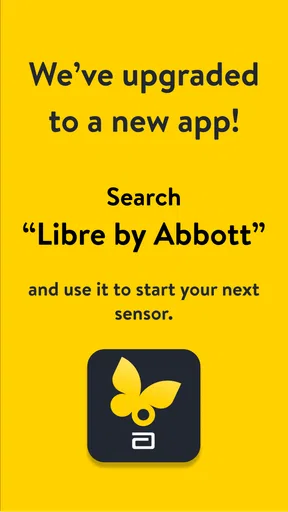
There is an important naming wrinkle: the app’s store summary says it is not the latest app and points people toward “Libre by Abbott.” I would pay attention to that before installing or switching phones. If you are starting fresh, confirm which Abbott app is currently intended for your sensor and region; if you already use this one, don’t assume that changing apps is a routine update. A CGM setup depends on the sensor, phone compatibility, and app working together.
What using it is like
At its best, this is a quick-glance tool. I can picture checking a reading while getting ready for work, then looking at the day’s graph later when I have enough time to think about what a pattern might mean. That is a more useful rhythm than treating every individual number as a decision by itself. The app can help make readings and trends easier to see, while treatment choices still need to follow the plan you have made with your healthcare professional.
Starting with a sensor
Setting up the app is pretty straightforward. Once you’ve got the sensor applied, you simply download the app from your respective app store. It’s available on both Android and iOS, which is super convenient. Just follow the prompts, sync the sensor, and you’re good to go. I found the process to be a breeze, even for someone who's not exactly tech-savvy.
Still, I would do the first setup when I’m not rushing out the door. Check that the phone is supported, follow the app’s pairing instructions, and leave time to resolve any setup prompt before relying on the system during a busy day. If you are changing phones, treat that as a small transition rather than assuming your existing setup will carry over automatically. The practical question is not just whether the app installs, but whether the sensor and the phone you plan to carry work together as expected.
Reading the screen and the patterns
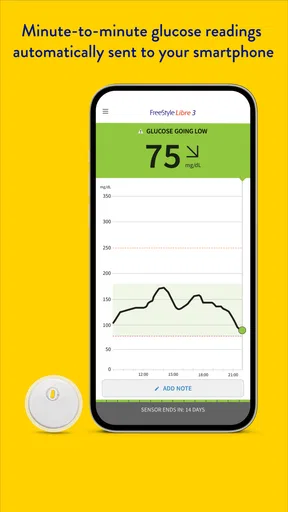
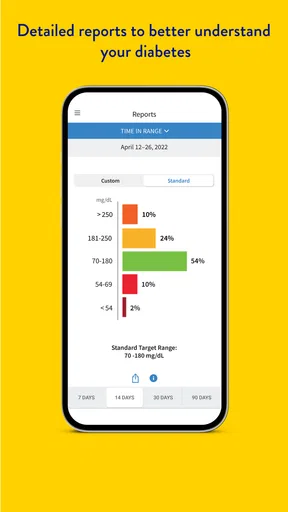
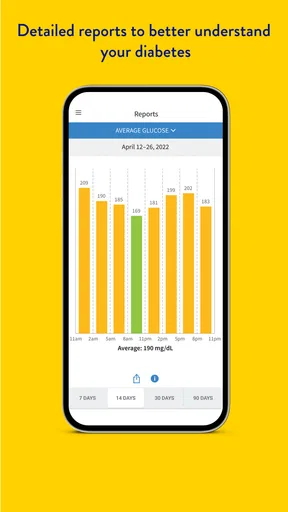
Now, let’s talk features. The app provides real-time glucose readings right on your smartphone. You can check your levels anytime just by opening the app. No more guesswork! Plus, it gives you those much-needed trend graphs. You can easily see how your glucose levels fluctuate throughout the day, making it easier to manage your diet and daily activities.
Worth Reading Before You Choose

EA SPORTS FC Mobile 26 Is a Bigger Football Game, but It Takes Time

Flipboard Shows What News Apps Must Do Beyond the Feed

Switching to Android Auto Means Rethinking Your Driving Routine

Google Calendar Makes a Crowded Week Easier to Manage

Ludo King Makes the Most of the Minutes Between Plans

Baby Panda World Brings Quick Play to Modern Phones, but Its Game Library Feels Busy
The graphs are most valuable when I use them to ask a focused question rather than to judge a whole day at a glance. For example, someone might compare the shape of a familiar morning routine across days, then bring that observation to a clinician instead of making a sudden adjustment based on one surprising reading. A useful habit is to note what was different—meal timing, activity, or schedule—when a pattern stands out. That gives a conversation more context without asking the app to explain the cause on its own.
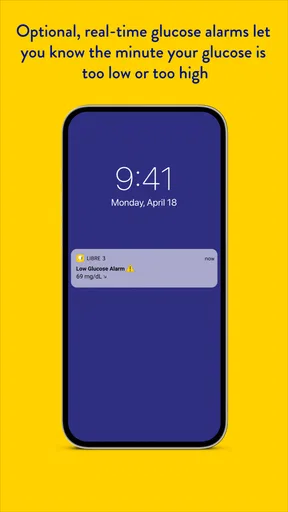
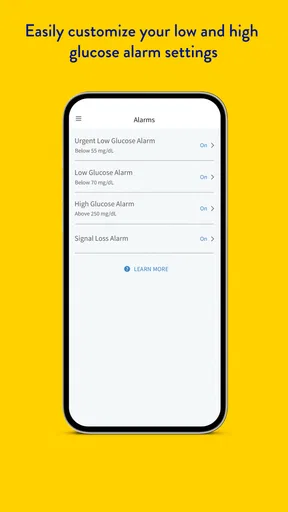
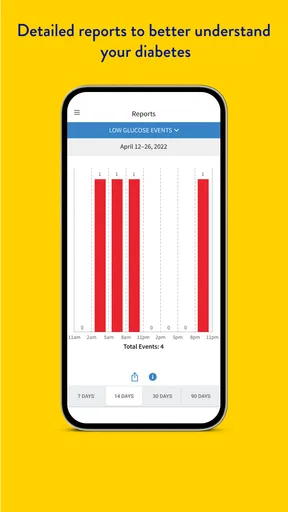
Another cool feature is the customizable alerts. You can set them to notify you if your levels are too high or too low. It’s like having a safety net, ensuring you can take action before things get too serious.
Alerts can be helpful, but I would set them deliberately. A notification that is too easy to dismiss or that arrives at an inconvenient time may become background noise; an alert that is meaningful to you is more likely to prompt a useful check-in. Think about when your phone is usually silenced, where you keep it overnight, and whether you notice notifications during work or exercise. The app’s alerts support awareness; they are not a substitute for your personal care instructions or for getting help when you need it.
A practical fit in a busy day
Imagine leaving home for a long stretch and wanting to check a reading without stopping to do a separate manual check. A phone-based view can make that small moment easier, while a later look at the graph can help you review how the day unfolded. The trade-off is that the experience depends on keeping the phone available and the sensor connection working. If your phone is often left in another room, switched off, or out of reach, the convenience may be less compelling than it sounds.
This is where the app differs from a traditional meter workflow. A meter is a deliberate, individual check; this app is designed around ongoing sensor readings and viewing trends. Neither approach is automatically right for everyone. Someone who prefers a simple spot check, does not want to wear a sensor, or has a phone that is not compatible may be better served by another option recommended by their care team. I see the CGM app as especially useful for people who want more visibility between appointments and are comfortable building phone checks into the day.
Interface and everyday usability
The interface is clean and intuitive. I appreciate that it’s not cluttered with unnecessary info. Just what you need, when you need it. The graphs are visually appealing and easy to understand, even if you’re not a numbers person. I mean, who wants to decipher complex charts when you’re trying to manage your health?
Navigation is smooth, and I didn’t experience any lag. The app is designed to be user-friendly, and it definitely delivers on that front.
For a more useful review of a day, I would look at the trend when I can give it attention, rather than opening the app repeatedly without a reason. That keeps a quick status check from turning into constant screen-watching. It also makes the graph easier to discuss: a clear question, such as whether a routine seems to coincide with a recurring pattern, is more actionable than a collection of isolated glances. The screen can organize information, but interpreting it still takes judgment.
Sharing and conversations with others
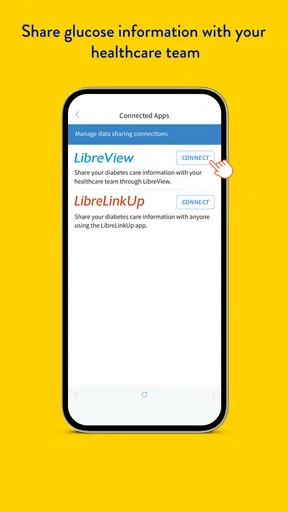
One of the standout features for me is the data-sharing capability. You can easily share your glucose data with healthcare professionals or loved ones. This feature can be a lifesaver, literally. Whether it’s a routine check-up or an emergency, having accurate data readily available is invaluable.
Sharing is most useful when it has a purpose: preparing for an appointment, helping a trusted person stay informed, or making it easier to discuss a pattern. I would decide in advance who should see the information and what kind of support I want from them. A family member looking at readings is not the same as a clinician interpreting them, so I would keep those roles clear. If you are setting up sharing for someone else, make sure they understand what access means and how to raise a concern without turning every reading into an alarm.
Connection, phone habits, and privacy
Let’s talk tech for a second. The app doesn’t drain your phone’s battery, which is a huge plus. I’ve used other health apps that left my battery gasping for life. Not this one. Also, connectivity is seamless. Once your sensor is synced, the app maintains a reliable connection.
Even with a smooth connection in normal use, I would not build a plan around the assumption that a phone will always be nearby or that a connection can never be interrupted. Before depending on readings during a particular activity, make sure you understand the sensor and app instructions for that situation. If the display does not behave as expected, it is better to follow the product guidance and your care plan than to guess from an old screen. Keeping the phone charged and accessible is a modest but practical part of using a phone-based monitor.
In today’s digital age, privacy is a biggie. Rest assured, the app takes your data security seriously. All data is encrypted, and you have control over who can access your information. It’s comforting to know your health data isn’t just floating around in the digital ether.
I would still review sharing choices as part of setup, especially if a phone is shared with family or if you are helping another person manage their device. Health information can be personal even when the reason for sharing is supportive. Being selective about who receives access makes the feature more useful and avoids treating broad access as the default. If your needs change, revisit those choices rather than leaving an old arrangement in place indefinitely.
Who should consider it—and who may prefer another route
This app makes the most sense for someone who already uses the FreeStyle Libre 3 sensor system, wants readings and trends on a compatible phone, and is willing to check alerts and graphs as part of a routine. It may also suit a person who benefits from sharing information with a trusted supporter or bringing a clearer record into a healthcare conversation. The product has more than one million installs, but popularity does not remove the need to check compatibility and the current app direction before getting started.
I would hesitate to recommend it to someone who wants a stand-alone diabetes diary, dislikes wearing a sensor, or is looking for a phone app to make treatment decisions for them. It is also a poor fit if you cannot reliably carry or use a compatible phone and have no suitable alternative arrangement. In those cases, a traditional meter or another monitoring option discussed with a clinician may be more practical. The best choice depends on how you manage your day, not on which screen looks more modern.
What has changed, and what to keep an eye on
The version history detail available to users today is the current 3.6.6 release, while the product itself dates to May 27, 2022. I would not infer a particular feature change from those facts alone. For someone already using the app, the sensible approach is to check the version and compatibility guidance when updating, especially if the phone’s operating system or sensor setup is changing. For someone choosing it now, the store’s direction toward Libre by Abbott is the more immediate point to resolve before installation.
That distinction matters because an app update, a newly named app, and a change in the sensor system are not necessarily the same thing. I would look for Abbott’s current instructions for the US product before moving an established setup, and I would avoid switching in the middle of a day when I need uninterrupted access. What I would watch for is clear guidance on which app supports the sensor I use, whether my phone remains compatible, and how any transition affects the way I view or share readings.
Final thoughts
Overall, the FreeStyle Libre 3 – US app is a game-changer for anyone managing diabetes. It’s like having a personal health concierge, giving you insights and peace of mind. Whether you’re tech-savvy or not, the app is easy to navigate and packed with features that genuinely make life easier.
If you’re considering a CGM app, this one should definitely be on your radar. It’s reliable, user-friendly, and, most importantly, helps you take control of your health. Go ahead, give it a try. Your future self might just thank you!
Pros
- Seamless glucose tracking with real-time updates.
- Compact sensor design for discreet usage.
- Easy integration with other health apps.
- User-friendly interface for all ages.
- Quick setup with minimal calibration needed.
Cons
- Requires compatible smartphone for full functionality.
- Limited support for older operating systems.
- Sensor may not adhere well to all skin types.
- Potential data syncing issues with other devices.
- Subscription required for advanced features.
FAQs for FreeStyle Libre 3 – US
What is FreeStyle Libre 3 – US and how does it work?
FreeStyle Libre 3 – US is a continuous glucose monitoring (CGM) system designed for diabetes management. It works by using a small sensor applied to the skin, which measures glucose levels every minute. The data is sent to a compatible smartphone app via Bluetooth, allowing users to track their glucose levels in real-time without fingersticks.
Is FreeStyle Libre 3 – US compatible with my smartphone?
FreeStyle Libre 3 – US is compatible with many iOS and Android devices. However, it's important to check the official compatibility list on the app's website or within the app store description to ensure your specific device is supported. Compatibility may vary based on your phone's operating system version and hardware specifications.
How long does the FreeStyle Libre 3 sensor last, and how is it replaced?
Each FreeStyle Libre 3 sensor lasts up to 14 days. After this period, you'll need to replace it with a new sensor. The replacement process is simple: you remove the old sensor and apply a new one using the applicator provided. Detailed instructions are included with the sensor kit for easy installation.
What are the main benefits of using FreeStyle Libre 3 – US over traditional glucose monitoring methods?
FreeStyle Libre 3 – US offers several advantages over traditional fingerstick methods. It provides continuous, real-time glucose readings, allowing for better glucose management. The app offers insights, trends, and alerts for low or high glucose levels, reducing the need for frequent manual checks and improving overall diabetes management.
Are there any costs associated with using FreeStyle Libre 3 – US?
While the FreeStyle Libre 3 app itself is free to download, there are costs associated with purchasing the sensors. These costs can vary based on your insurance coverage and location. It's advisable to check with your healthcare provider or insurance company to understand the potential costs and coverage options available to you.


